
Asana Free vs. Premium 2026
What changed in Asana's Personal and Starter tiers this year

Things have been moving fast in the Asana world! Between the March 2026 release notes and some meaningful changes to what each tier offers, now is a great time to take a fresh look at the Personal vs. Starter decision. Let's dig into this year’s comparison!
Asana Personal – Free, But Smaller Than Before
Pricing: Free
While the March 2026 release also brought some helpful updates to the Personal plan, the elephant in the room is that Asana has dropped the Personal plan from 10 users down to 2 users. If you've been using the free tier with a small team, this is a big deal, and it may be the nudge that pushes you toward Starter. That said, for true solos or a duo partnership, Personal is still a solid way to get organized without spending a dime.
It's a good fit if you're:
A freelancer managing your own projects and client work
A solopreneur building out your first workflows
A two-person team that just needs the basics
Key Features:
| Asana Personal Key Features 2026 | |
|---|---|
| Up to 2 users | The Personal plan now caps at 2 collaborators, ideal for a solo operator or a two-person team. |
| Unlimited tasks, projects & storage (100MB per file) | Track everything without worrying about hitting a ceiling. |
| List, Board & Calendar views | Three solid ways to see and manage your work depending on how your brain works. |
| Basic search | Filter tasks by assignee, due date, or status to find what you need fast. |
| Status updates | Post progress updates on your projects to keep anyone looped in. |
| iOS & Android mobile apps | Manage tasks, check due dates, and respond to comments from anywhere. |
| Time tracking via integrations | Connect tools like Harvest or Everhour to track hours without leaving your workflow. |
| 100+ free integrations | Slack, Google Drive, Zoom, and more. Plug in the tools you already use. |
Limitations:
No AI tools or automation features
No Timeline or Gantt views
Limited to 2 users per workspace
No custom fields, advanced search, or reporting dashboards
No forms for request intake
If you're on a small team that previously used Personal with more than two people, it's worth revisiting whether Starter makes more sense now.
Asana Starter – For Teams Ready to Do More
Pricing: $10.99/user/month billed annually (or $13.49/month billed monthly)
While Personal covers the basics, and Starter covers almost everything else. Automation, Asana AI, reporting, custom fields and more take your Asana usage from just a to-do list to true work management. These features reduce the back-and-forth, cut down on manual updates, and give you data driven insights into how work is moving.
One thing worth highlighting: AI Studio is now included in Starter. That means you can build custom AI workflows like automated field updates, request triage, or project status drafting without needing an enterprise contract. If you've been curious about Asana AI, Starter is your entry point.
And if you want to take things a step further, AI Teammates are available as an add-on on Starter and above. They understand the context of your team's projects and can keep things moving even when no one's watching. It's still early days for this feature, but it's one worth keeping an eye on if AI-powered workflows are on your radar.
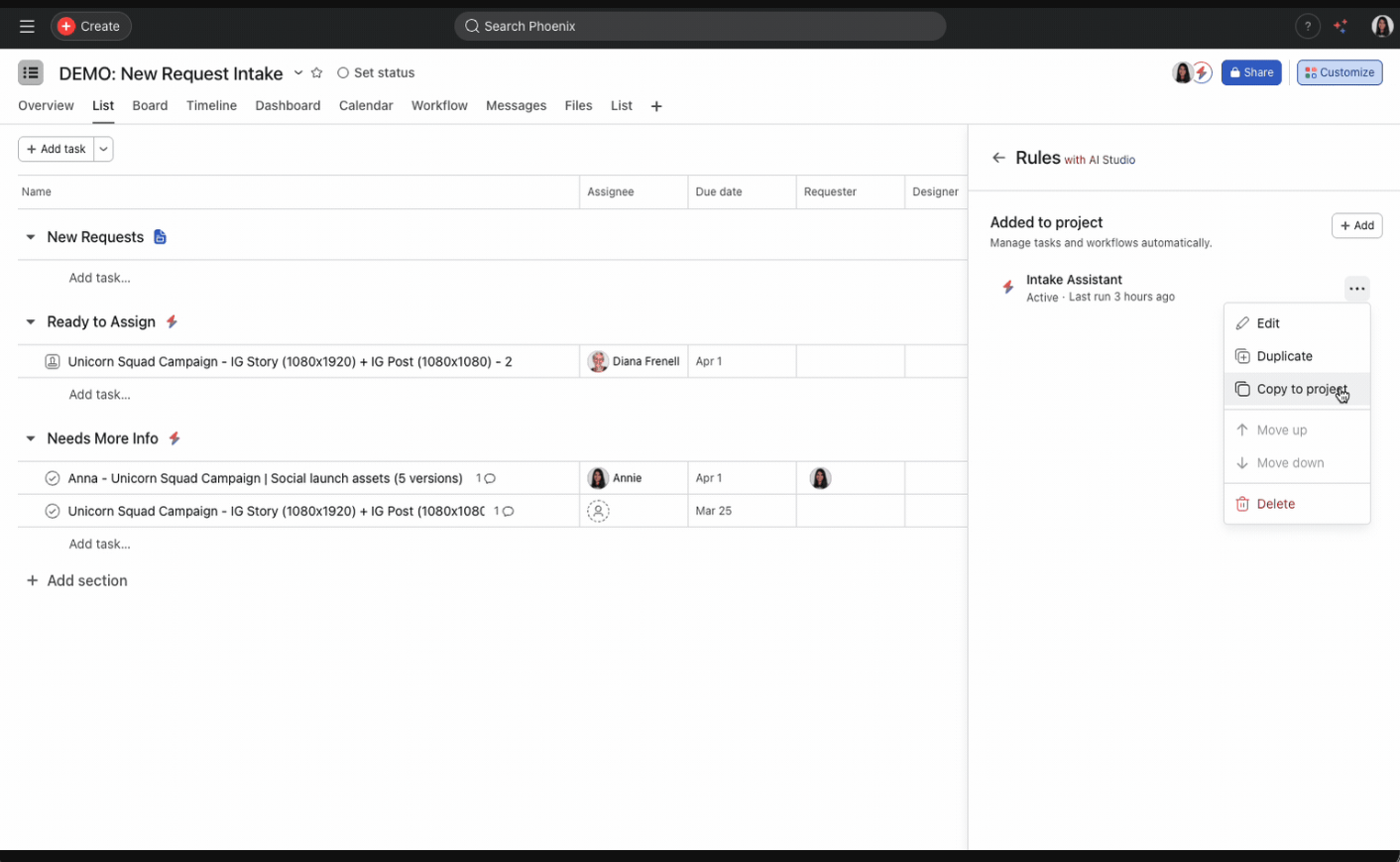
The March 2026 release also brought some meaningful Starter updates worth knowing about. Rules got a big quality-of-life boost with the ability to duplicate rules, copy them to other projects, and reorder them in the customize menu. Text field values can now be used as triggers and conditions in rules, which opens up a lot of new workflow possibilities. Slack users will also appreciate that AI Studio now supports Slack intake and comment rules, so you can automatically create Asana tasks from Slack messages and sync comments between Slack threads and Asana tasks. Solid month for Starter users.
Key Features:
| Asana Starter Key Features 2026 | |
|---|---|
| Asana AI | Draft tasks, status updates, and status reports using built-in AI with no extra setup needed. |
| AI Studio | Build custom AI workflows with a no-code builder. Great for automating intake, updates, and follow-up. |
| Smart Features | Smart Fields, Smart Summaries, Smart Status, and Smart Chat help you get context fast without digging through tasks. |
| AI Teammates (add-on) | Autonomous AI agents that work alongside your team, available as an add-on on Starter and above. |
| Unlimited users | No seat caps. Add your whole team without worrying about cost per person. |
| Unlimited free guests | Invite clients and external collaborators at no extra charge. |
| Timeline & Gantt views | See your full project schedule, dependencies, and deadlines in one view. |
| Workflow Builder | Create no-code automations that handle assignments, due dates, and status changes automatically. |
| Unlimited rules | Set it and forget it. Rules run in the background so your team doesn't have to. |
| Custom fields | Add the data points that matter to your team: priority, stage, request type, effort estimate, and more. |
| Forms | Capture standardized requests from clients or internal stakeholders that flow directly into a project. |
| Universal reporting & project dashboards | Get a real-time view across all your projects with visual charts and metrics. |
| Advanced search | Filter across your whole workspace and save those searches for quick access. |
| Start dates & times | Plan work with precision. Set when tasks start, not just when they're due. |
| Custom project templates | Build repeatable templates for onboarding, campaign launches, editorial calendars, and more. |
| Private teams & projects | Keep sensitive work visible only to the people who need to see it. |
| Admin console | Manage team members, permissions, and settings from one centralized dashboard. |
Want to go deeper on Asana AI? Here are some resources to get you started:
How to Choose
You’ll Likely Want to Stick with Personal if:
You're working solo or with one other person
You don't need automation, AI, or reporting
You're just getting started and want to explore Asana before committing
Consider Upgrading to Starter if:
You have more than two people collaborating regularly
You want access to AI, automation, and custom workflows
You need Timeline/Gantt, custom fields, or dashboards
You're using Asana to manage client intake or recurring processes
Questions to Help You Decide
How many people will regularly be working in Asana? With Personal now capped at 2 users, most teams will need Starter. It's worth running the numbers, as the per-seat cost is often easy to justify when you factor in the time saved on manual work.
Do you need to visualize project schedules or dependencies? If seeing your project on a timeline matters, Starter is what you need.
Are you tired of manually updating task statuses, assignments, or due dates? Workflow Builder and unlimited rules in Starter take care of the repetitive stuff so your team doesn't have to.
Do you want AI to help you work faster? Starter includes Asana AI and AI Studio, tools that can draft updates, suggest fields, summarize projects, and even build custom workflows for you.
Are you interested in AI that can actually take action in your workspace? AI Teammates are available as an add-on on Starter and above. If having an AI agent that works autonomously alongside your team sounds useful, it's worth exploring.
Do you need a way to collect requests from teammates or clients? Forms are a Starter feature and they're one of the most underrated things on the platform.
Do you need custom fields to track priority, status, or intake type? Personal doesn't have them. Starter does.
What's your budget? If cost is the barrier, Personal is still worth using. Just be aware of the 2-user limit and the feature gaps. If you outgrow it, Starter at $10.99/seat/month billed annually is a reasonable investment for what you get.
Still Not Sure?
Thinking about making a change to your Asana setup but not sure where to start? Let's chat and see if I might be able to help.