
Asana 🤝 StreamWork
If you're managing creative work in Asana, you've probably experienced this: A designer uploads version 3 of a social campaign. Three stakeholders leave feedback across different comment threads. Someone downloads the file to mark it up in a PDF. Another person references "the version from Tuesday" but no one knows which Tuesday. By the time approvals roll around, you're scrolling through 50+ comments and attachments, hoping you've captured everything and praying no one accidentally submits an outdated version.
Yikes.
Asana can be an incredibly powerful tool for creative production. When it comes to creative reviews and approvals? Ehhhhh, it can be a struggle. I've seen this challenge countless times working with Marketing, Brand, and Creative teams trying to optimize their workflows.
What if there was a way to transform your creative review process without abandoning your Asana infrastructure?
Why Creative Reviews Break Down in Asana
Despite having a native review tool, Asana’s approach isn’t designed for the volume of changes and versioning many creatives need. In addition, it’s lacking several key features (versioning, Workflow Automation, etc.) that make proofing tools frictionless. Asana is a work management platform with proofing features– Not a proofing tool, and that distinction is important when you're trying to manage multiple rounds of feedback, version control, and approvals.
Here's what typically happens:
The Subtask Problem
Some teams try using Asana's built-in proofing tools, which automatically converts every piece of markup feedback into a subtask. For complex creative with multiple reviewers, this means a single task suddenly has 50+ subtasks. What was supposed to create clarity instead creates overwhelming noise.The Attachment Explosion
In this scenario, every revision gets uploaded as a new attachment. Version 1, version 2, version 2_final, version 2_final_ACTUAL. Reviewers scroll through an ever-growing list trying to find the latest iteration while designers maintain cluttered download folders full of marked-up PDFs.The Version Control Chaos
Without a clear system for version tracking, teams lose visibility into how many review rounds have occurred. There's significant risk that an old version gets submitted as the final asset because someone grabbed the wrong attachment.The Context Hunt
Reviewers wade through long comment threads hoping they have all the context they need. "Did Sarah already approve this?" "Which changes from the last round were actually implemented?" "Is this the version that incorporates legal's feedback?" These questions shouldn't require detective work.
The real cost isn't just time wasted, but the increased revision cycles, approval bottlenecks, and very real risk of the wrong items going to print that compounds with every project.
What Makes a Good Creative Review Process
After years in Creative Operations, I have my own opinions on non-negotiables when designing a creative review process:
Centralized Version Management
All versions and feedback should live in one place where the "latest" is always obvious and previous iterations remain accessible for reference.Clear Status Tracking
Review status needs to integrate seamlessly with your existing Asana workflows—not operate in a separate system that requires manual updates.Easy Version Comparison
Reviewers and designers should be able to toggle between versions to see what changed without downloading multiple files.Automated Approval Flows
Tasks should move through multiple stages of review without creating duplicate tasks or subtask chaos. Most importantly, your solution needs to work with your existing Asana setup—not require your team to do the same work in two places.Stakeholder Accessibility
Even external reviewers who don't live in Asana daily should be able to view the latest version with a single click.
Enter StreamWork: The Missing Piece for Asana Creative Teams
I've test-driven many creative review tools over the years. While they’d address a few key areas, they didn't integrate with Asana at all, creating disconnected processes that defeated the purpose of centralized project management.
StreamWork was different.
The Integration of My Dreams
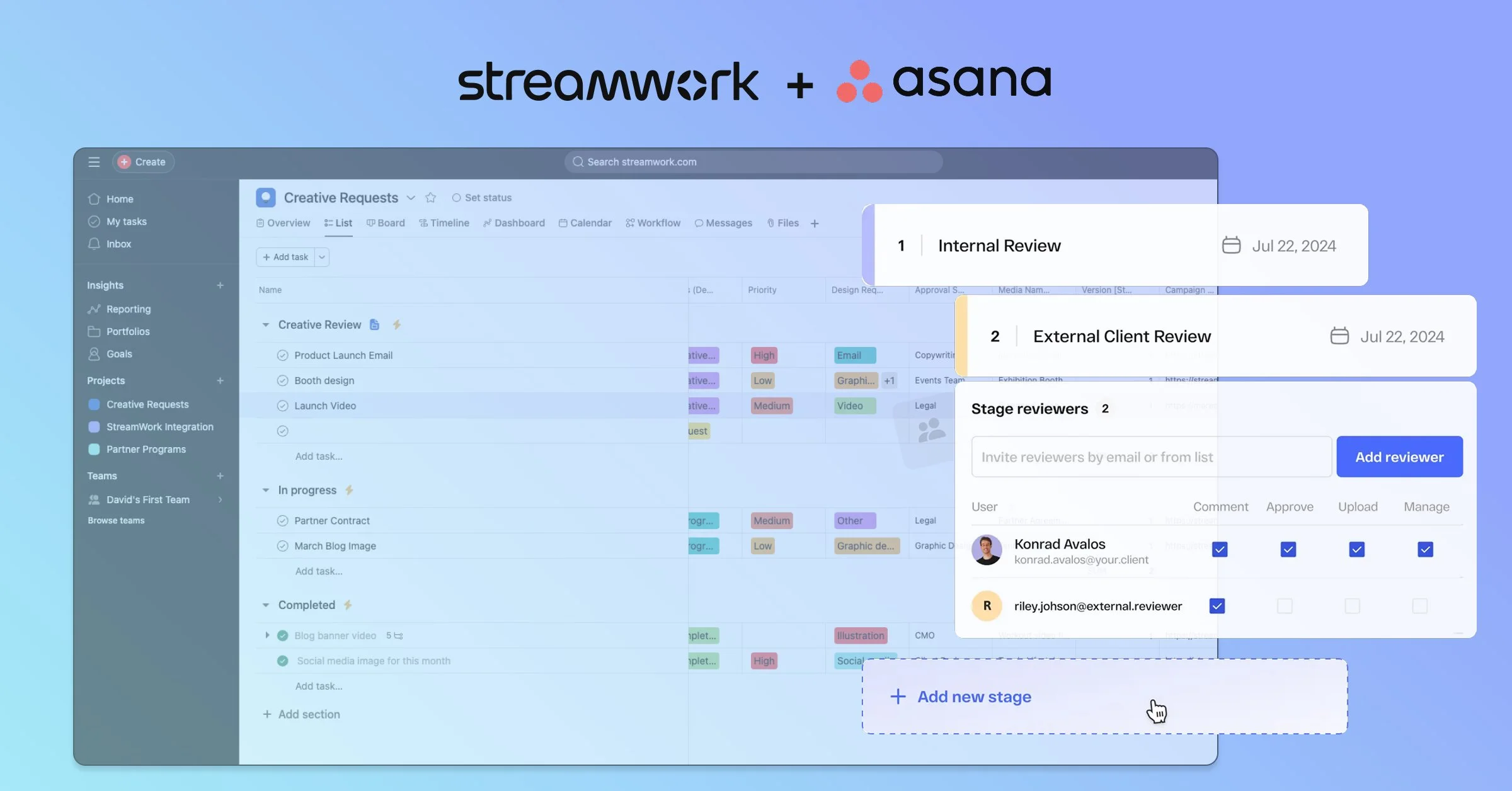
StreamWork was the first product I found with an Asana integration. StreamWork's custom fields sync directly with Asana, meaning review statuses update in real-time within your existing project structure.
When I saw how seamlessly StreamWork statuses pushed into Asana, I was smitten. This was a solution that could enhance what teams were already doing in Asana without disrupting their workflows.
How StreamWork Solves the Core Problems
Centralized Creative Hub
StreamWork creates a dedicated space for each creative asset where all versions and feedback live together. No more scrolling through 50 comments and attachments in Asana—everything is clearly organized and accessible.Version Tracking Built In
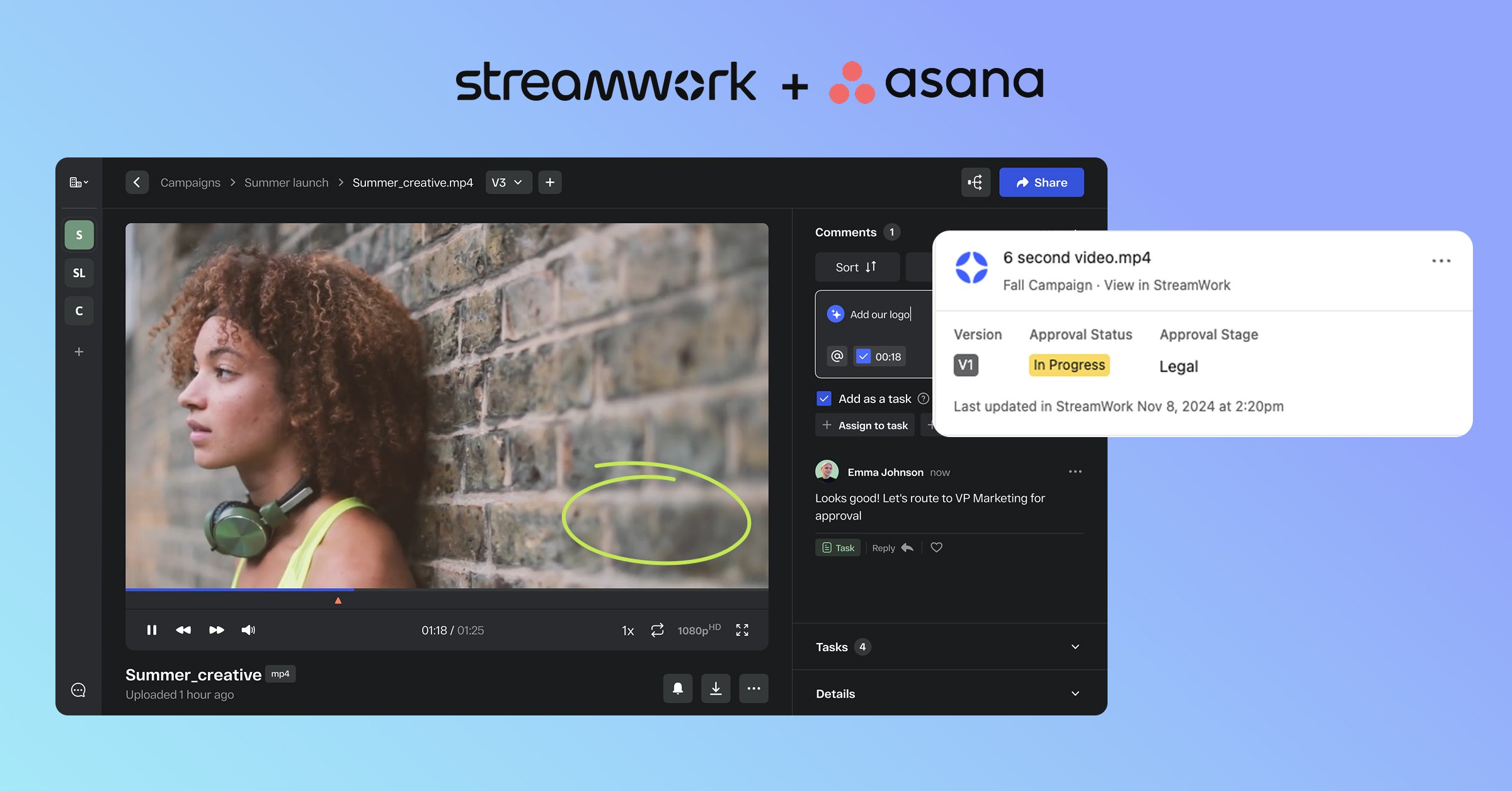
Every asset automatically provides insights into how many rounds of reviews have occurred. You can toggle between versions to see old iterations, which has been a huge relief for my clients.Status Sync with Asana
Here's where the magic happens: StreamWork statuses sync directly into Asana custom fields. This means your existing automations can respond to review progress without any manual intervention.One-Click Access
Reviewers can view the latest version with a single click and even download it if they need to share with external stakeholders. No more "which file is the right one?" confusion.
Building Dynamic Approval Workflows with StreamWork + Asana
As an Asana Services Partner, I'm constantly building custom workflows and automations to help teams navigate tricky approval processes. StreamWork's custom fields integrate beautifully into these existing automations.
Here's what this looks like in practice:
Custom Field Integration
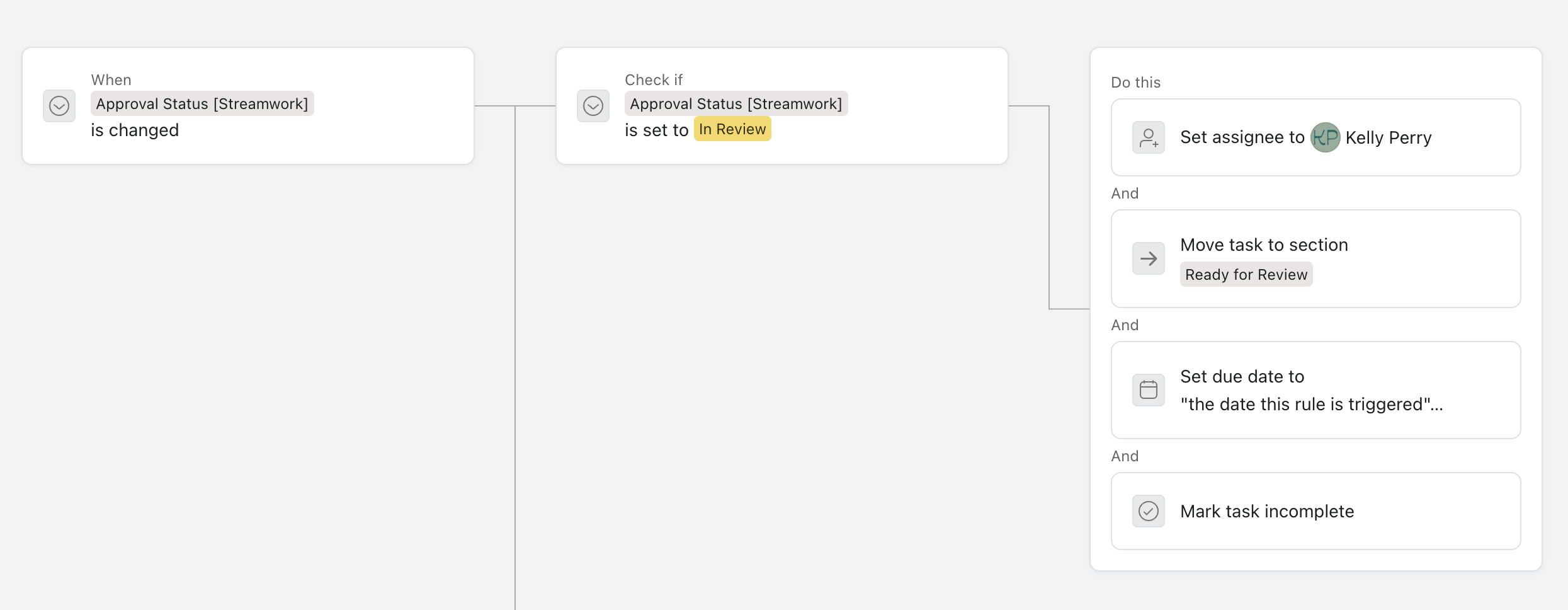
StreamWork adds custom fields to your Asana tasks that reflect the current review status. These fields play well with Asana's automation rules, allowing you to build sophisticated routing logic.
Dynamic Task Routing
Create automations that dynamically route Asana tasks to the next approver based on StreamWork status. When the status changes to "Ready for Legal Review," the task automatically assigns to the legal reviewer you determined in Asana. When it moves to "Final Approval," it routes to the creative director.
Single Task, Multiple Review Stages
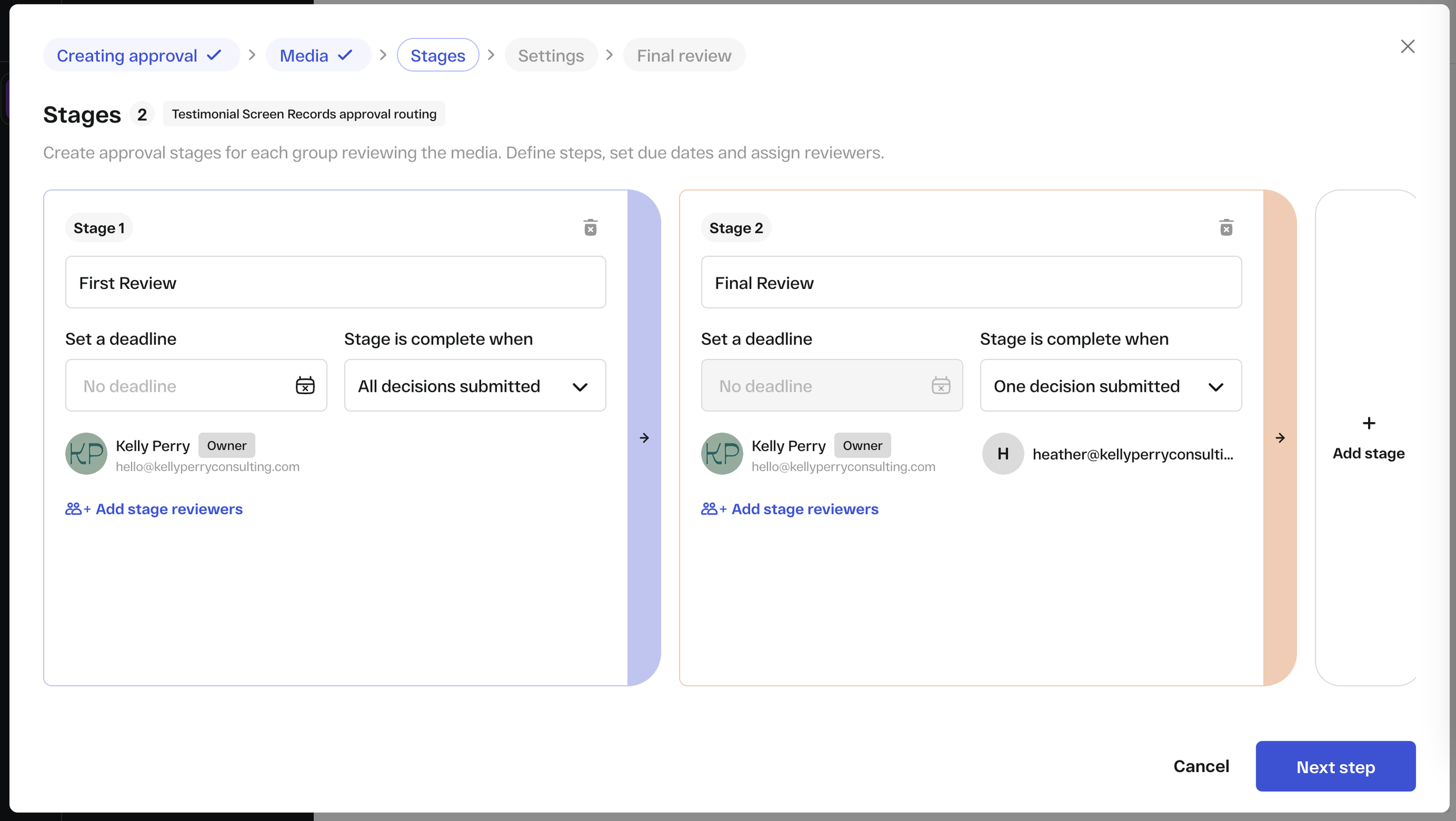
Previously, complex approval processes often required creating subtasks for each review stage or duplicating tasks across different projects. With StreamWork's status integration, a single task can move through multiple stages of review while maintaining clear status visibility.
Reduced Automation Complexity
Before StreamWork, creative approval automations in Asana could become incredibly complex—full of nested rules trying to account for every scenario. StreamWork simplifies this by providing reliable status triggers that automations can respond to.
The Impact
The transformation has been significant for my clients using StreamWork:
Time Savings
Reviewers no longer waste time scrolling through comment threads hoping they have all the context. They click into StreamWork, see the latest version with all feedback in one place, and can make decisions quickly.Risk Reduction
The risk of submitting an outdated version has essentially disappeared. Everyone always knows which version is current, and the version history provides clear documentation of the creative evolution.Cleaner Asana Tasks
Tasks remain clean and manageable without the subtask explosion that plagued previous approaches. Your Asana projects stay organized and scannable.Better Insights
Version tracking provides visibility into how many review rounds are actually happening. This data helps teams identify bottlenecks and optimize their creative brief processes to reduce unnecessary revision cycles.Easier Stakeholder Management
External reviewers or executives who don't live in Asana can still easily access and review creative without needing extensive platform training.
Is StreamWork Right for Your Team?
StreamWork + Asana is particularly valuable if your team is experiencing:
Version control chaos with multiple reviewers and revision rounds.
Approval bottlenecks where tasks get stuck waiting for feedback.
Stakeholder confusion about which creative version is current.
Overwhelming subtasks from proofing tool implementations.
Time wasted searching through comments for consolidated feedback.
Risk of errors from submitting outdated creative assets.
If you're already managing creative work in Asana and struggling with the review and approval stages, StreamWork integrates seamlessly without requiring you to rebuild your entire project management infrastructure.
Key Takeaways
Creative review processes fail in Asana not because Asana is inadequate, but because it wasn't designed specifically for visual feedback and version management. Rather than abandoning your Asana setup, the solution is finding the right complementary tool that enhances what Asana does well.
StreamWork provides that missing piece:
Centralized version management with clear organization
Status sync that integrates with existing Asana automations
Version comparison and tracking capabilities
Simplified approval workflows without subtask chaos
Stakeholder-friendly access to latest creative
The result is a creative review process that actually works—where feedback is consolidated, versions are tracked, and approvals flow smoothly through your existing Asana infrastructure.
Ready to streamline your creative reviews?
Ready to streamline your creative reviews? Join me and the StreamWork team for a live fireside chat on March 4th where we'll dive deeper into building seamless approval workflows in Asana.
Can't wait until March? I'm offering new StreamWork customers who mention this article one hour of free workflow integration support to help you get your approval process up and running smoothly. Send me an email to claim!